Bundling third-party type stubs with internal Python libraries
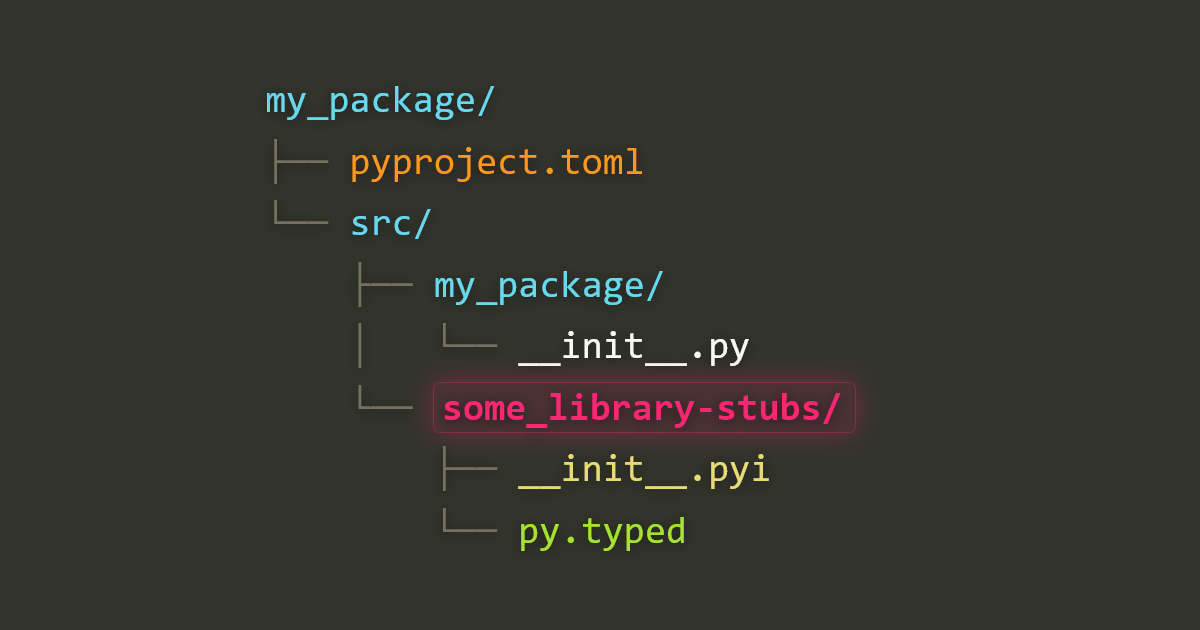
You can ship type stubs for a third-party library with your own Python library, so everyone who installs yours gets them too. When you own both the library and its consumers, this sidesteps the need to publish and maintain a separate stub-only package. You can stub only the parts you actually use.
You don’t need a plugin to pull this off, but you do need to configure your build backend and structure your project in a way that may feel unconventional. In this article, I’ll walk through the problem this technique is meant to solve and how it works.
I’ll assume that you are already sold on static typing with Python. If not, read Jonathan Chun’s “To Type or Not to Type?” (2025) and watch Dustin Ingram’s “Static Typing in Python” (2019) for context.
Fixing type errors for an untyped library #
If your code depends on a third-party library that lacks typing support and has no stubs in typeshed, your static type checker may complain with errors like these:
# mypy
Skipping analyzing X: module is installed, but missing library stubs or py.typed marker

# pyright
Stub file not found for "X" (reportMissingTypeStubs)
At this point, you have three options:
- Suppress the errors.
- Update the library to support type checking.
- Write your own type stubs for the library.
Let’s assume that you’d prefer to not suppress the errors, and that updating the library is off the table. Maybe the library needs to support legacy Python versions. Maybe its maintainers don’t like typed Python. Maybe sensitive team or vendor dynamics in your organization prevent you from pushing that change. Whatever the reason, let’s assume that you want to resolve the type issues properly, within your domain of control.
Your remaining option is to write stub files and configure your type checker to look for them in a certain directory. However, these stubs will be available only to your package during development, not to its consumers. If your package wraps the untyped library and returns its objects, your package’s consumers will run into similar type troubles.
You may find yourself reading mypy’s docs for creating PEP 561 compatible packages and evaluating whether you really want to maintain a stub-only package for that third-party library, when you only need a subset of its functionality.
If you are responsible for maintaining both the package and its consumers, you may wonder if there’s a way to bundle your custom stubs with your package, so you only need to maintain them in one place. The docs make no mention of the possibility.
This is the problem we are here to solve.
Letting your build backend bundle the stubs #
To ship stubs with your library, you need to set up your project in a way that may feel counter-intuitive if you’ve been relying on type checker documentation.
To grok the solution, we need to understand the distinction between import packages and distribution packages. What we want to do is to create a stub-only import package and have the build backend include it in the same distribution package as our primary import package. Once we frame the problem in these terms, the solution falls into place.
We need to do the following:
- Write a stub-only import package for the untyped library.
- Place the
*-stubsdirectory beside the primary import package’s directory, so they share the same import root. - Tell the build backend about the stub directory explicitly, rather than leaning on its automatic package discovery.
Assuming a src/ layout, your project should look like this:
my_package/
├── pyproject.toml
└── src/
    ├── my_package/
    │   └── __init__.py
    └── some_library-stubs/
        ├── __init__.pyi
        └── py.typed
How you configure pyproject.toml depends on which build backend you use.
With hatchling (used by Hatch), list the directories under your wheel target’s packages:
[tool.hatch.build.targets.wheel]
packages = ["src/my_package", "src/some_library-stubs"]
With uv_build (Astral’s new default backend for uv), list the module names instead:
[tool.uv.build-backend]
module-name = ["my_package", "some_library-stubs"]
With that in place, building a wheel includes both packages as top-level entries:
my_package/__init__.py
some_library-stubs/__init__.pyi
some_library-stubs/py.typed
my_package-0.1.0.dist-info/...
Your consumers install your distribution package and receive your stubs alongside your import package in site-packages/. Their type checker resolves some_library against your bundled stubs with no further configuration on their end.
The same holds for editable installs. When you run e.g. pip install -e ., the backend writes a .pth file pointing at your src/ directory. Because the stubs share that root, they land on sys.path right next to your package. When you edit a stub, your type checker picks up on the change immediately, exactly as it does for your own source.
Note that the stubs sit beside your package in src/, not inside it, and not in a stubs/ or typings/ directory elsewhere. This runs against how stubs are usually stored for local use, but if you think of src/ as the container for what should be included in the distribution package, it makes sense. With this approach, you don’t need to configure mypy_path or stubPath (Pyright). Just do an editable install, and your type checker will use your *-stubs package.
This technique works for both src and flat layouts and with namespaced packages.
Two ways to get this wrong #
If the technique above feels too simple, that’s because the simple version hides two traps. Both cause silent failures: the build succeeds, but the stubs are not available. I ran into both issues, so they’re worth calling out explicitly.
Don’t put the stubs in their own root #
The conventional place for stubs is a sibling stubs/ or typings/ directory, segregated from your real source:
my_package/
├── pyproject.toml
├── src/
│   └── my_package/
└── stubs/
    └── some_library-stubs/
You can make this work for a regular install with hatchling: point force-include at the stubs/ directory and the wheel comes out fine. The editable install is where it falls apart. Hatchling writes a .pth file with one line per recognized import root. A *-stubs directory isn’t a valid module name, so Hatchling doesn’t count stubs/ as an import root, and it never makes it onto sys.path. Your own package imports fine, but the bundled stubs are invisible to your type checker.
It’s tempting to keep the stubs in stubs/ to follow convention, and use checker-specific settings (mypy_path, stubPath) alongside force-include. Don’t fall into that trap. As soon as you editable-install your package into a consumer, its stubs go missing. This approach also doesn’t work with the uv_build backend, which has no force-include equivalent. Remember: you are shipping your stubs, so they belong in src/.
For my first draft of this article, I wrote a Hatch build hook plugin to inject a second .pth entry for the stubs/ root on editable installs. It worked, but once I realized the whole problem disappears if the stubs simply share the src/ root, the hook had nothing left to do. Keep the stubs under your primary import root and there’s no gap to bridge.
Don’t rely on automatic package discovery #
Both backends can discover your packages for you, so it’s tempting to omit the explicit list. If you do, this won’t work. A *-stubs directory isn’t a valid Python identifier due to the presence of a hyphen, so automatic package discovery will skip right over it. With Hatchling, dropping the packages line entirely:
# Don't do this if you have stubs to ship.
[tool.hatch.build.targets.wheel]
…builds a wheel containing my_package/ and nothing else. There will be no warnings or errors, but the stubs won’t make it into your wheel. The same holds for uv_build if you leave out module-name. Listing every package explicitly is what keeps the stubs in the build.
When (not) to bundle stubs #
This technique should be used only when you control both the package and the things that install it. It was designed for a specific use case: an internal library shared across your own services.
Despite its narrow scope, it has its place. On a fast-moving project, where the team is deliberately keeping its tooling footprint small, maintaining a separate stub-only package can be a tough sell. Bundling the stubs keeps the cost to a single directory in a project you already ship.
If you elect to write partial stubs for only the functionality you use, this technique makes it easier to keep the stubs in sync with your package. It also gives a team that hasn’t committed to static typing a gentle on-ramp, without the overhead of a separate stub-distribution workflow.
However, this technique is not free of consequence for consumers of your package. Your *-stubs directory installs as a top-level import package in their environment. If two installed packages ship some_library-stubs, whichever installs second silently overwrites the first’s stubs, so which stubs a type checker sees depends on install order.
Avoid doing this for a public package that stubs a popular dependency. If someone else publishes some_library-stubs, or the target library starts shipping its own py.typed later, your bundled stubs will cause conflicts for your users. In that situation, maintaining a separate stub-only distribution (or contributing the stubs to typeshed) is the better choice, even though it is more work.
In short: do this if you control the package and its consumers. Avoid otherwise.
Recap #
- Structure your stubs as stub-only import packages.
- Put the stubs beside your primary package (e.g. in
src/, notstubs/ortypings/). - List the packages explicitly in your build backend
pyproject.tomlconfiguration. - Use this technique only when you control both the package and its consumers.
- Do more static typing with Python!